

What to Check After Phone Repair Before Leaving the Shop
November 25, 2026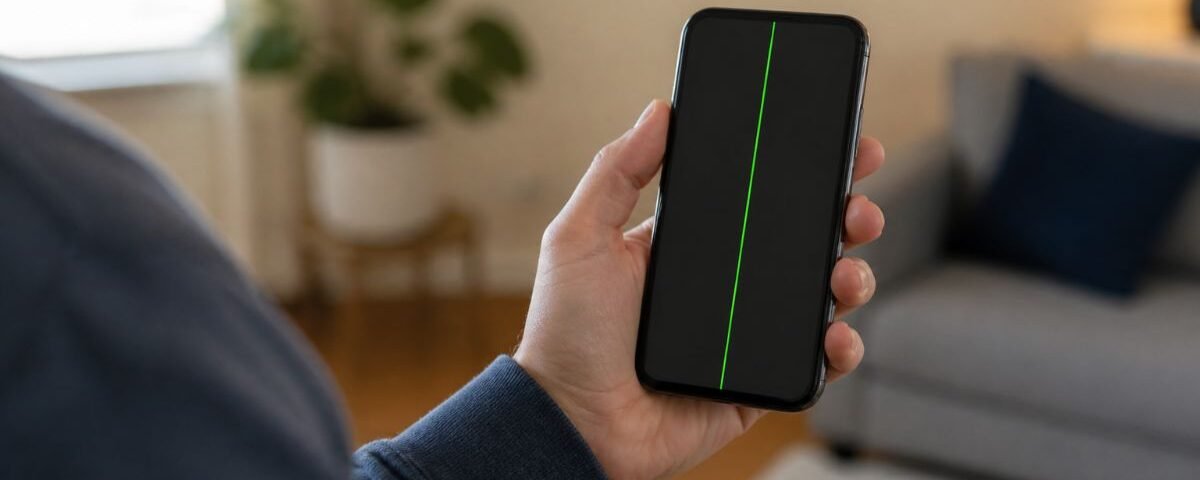
A green line on your phone screen can be frustrating, especially when the display looks perfectly fine otherwise. This issue often indicates a problem with the screen panel, display connections, or internal hardware. Sometimes, a temporary software glitch can also cause unusual display behaviour. Understanding the reason behind the green line can help you choose the right solution. In this guide, we’ll explain the common causes, troubleshooting steps, and how WeFixAll can help restore your phone’s display.
What Is a Green Line on a Phone Screen?
A green line on a phone screen is a bright vertical or horizontal line that remains visible while using different apps. It may appear suddenly, flicker occasionally, or stay permanently on the display.
In most cases, the issue is related to the display panel rather than the apps or content shown on your phone. Even if the glass is not cracked, internal screen components may be damaged.
Is It a Green Line, Green Dot, or Green Tint?
Before troubleshooting, it’s important to identify what you’re seeing.
| Display Issue | What It Usually Means |
| Thin vertical green line | Possible display panel fault |
| Small green dot | Camera or microphone privacy indicator |
| Green tint across the screen | Display setting or hardware issue |
If you see a small green privacy indicator, it may simply mean an app is accessing your camera or microphone. However, a permanent green line usually requires further investigation.
Why Is There a Green Line on My Phone Screen?
Several issues can cause a green line to appear.
Hardware Damage and Screen Wear
A damaged display panel is one of the most common causes. Accidental drops, pressure, bending, or internal component failure can affect the screen’s display circuits.
Sometimes, the green line appears even when there are no visible cracks or scratches.
Water or Moisture Damage
Moisture can enter your phone and affect internal connectors or display circuits. This may lead to corrosion, flickering, unusual colours, or permanent lines on the screen.
If your phone has been exposed to water, avoid charging it and arrange a professional inspection.
Software Updates and System Glitches
Occasionally, a software update or temporary system error can cause display abnormalities. If the green line appeared immediately after an update, a software-related issue may be worth investigating.
However, a persistent line is more likely to indicate a hardware problem.
AMOLED vs. LCD Display Problems
AMOLED displays produce light through individual pixels, while LCD screens use a backlight to illuminate the display.
AMOLED screen faults can sometimes produce bright green lines when individual display components or their connections stop working correctly.
Is It a Hardware or Software Problem? Try This Test
You can perform a simple screenshot test to identify the possible source of the problem.
- Take a screenshot while the green line is visible.
- Open the screenshot in your photo gallery.
- Check whether the green line appears in the screenshot.
- If the line is missing, the physical display is likely responsible.
- If the line appears in the screenshot, a software or graphics issue may be involved.
- Restart your phone and check whether the problem remains.
This test provides a useful indication, but it cannot confirm the exact cause.
Can You Fix a Green Line Without Replacing the Screen?
Sometimes, yes. If the issue is caused by a temporary software glitch, basic troubleshooting may help.
However, a physically damaged display panel generally requires professional screen repair or replacement.
Safe Steps to Try First
Before arranging a repair, try these troubleshooting steps:
- Restart your phone: A restart can resolve temporary display glitches.
- Install system updates: Check whether a software update is available.
- Remove recently installed apps: If the issue started after installing an app, remove it temporarily.
- Try Safe Mode: Android users can check whether a third-party application is causing the problem.
- Check for physical damage: Look for cracks, bends, or signs of liquid exposure.
Why a Factory Reset Should Be Your Last Option
A factory reset may help with certain software-related problems, but it cannot repair a physically damaged screen.
If you decide to reset your phone, back up your important photos, messages, contacts, and files first.
Avoid applications that claim to repair physical screen damage through software. They cannot restore damaged display components.
The Green Line Troubleshooting Guide
Use these four levels to understand what your phone might need.
Level 1: Temporary Glitch
The green line disappears after restarting or appears in screenshots. Check for software updates and recently installed applications.
Level 2: Occasional Flickering
The line appears and disappears without visible screen damage. Record a short video of the issue and arrange a professional inspection.
Level 3: Permanent Green Line
The line remains visible after restarting and does not appear in screenshots. This usually indicates a display hardware problem.
Level 4: Spreading Display Problems
Multiple lines, dark patches, flickering, or touchscreen problems may indicate worsening display damage. Back up your data and arrange professional repair.
Will the Green Line Spread?
There is no guarantee that a green line will remain the same or become worse. Some phones continue working with one permanent line, while others develop additional display problems.
The safest approach is to back up your important data and avoid putting pressure on the affected screen.
If the display starts flickering or becomes difficult to use, have it inspected by a repair technician.
Phone Screen Repair Options in Canada
Choosing the right repair solution depends on the condition of your device and the source of the problem.
Manufacturer Repair
Manufacturer repair services may be suitable for devices covered by an applicable warranty. Check the warranty terms and whether accidental or liquid damage is covered.
Authorized Repair Services
Authorized repair providers can inspect your device and determine whether the display requires repair or replacement.
Professional Independent Repair
An experienced independent repair technician can diagnose display problems, inspect internal connections, and recommend an appropriate solution.
At WeFixAll, customers can get professional phone repair assistance for display-related issues. Our technicians can help identify the cause of a green line and determine whether screen repair or replacement is needed.
Professional Screen Inspection
If your phone has a persistent green line, professional diagnosis is important. Avoid pressing, bending, or attempting to open the display yourself, as this can cause additional damage.
Will Warranty Cover a Green Line?
Warranty coverage depends on the phone manufacturer, device condition, and applicable warranty terms.
A green line caused by a manufacturing defect may qualify for warranty assistance. However, visible physical damage or liquid exposure may affect eligibility.
Before arranging a repair:
- Check your device warranty.
- Review the manufacturer’s repair policy.
- Ask whether the issue qualifies as a manufacturing defect.
- Confirm whether the repair includes a service warranty.
Canadian consumer protection rules may also provide additional rights depending on your province or territory.
Should You Repair or Replace Your Phone?
Before deciding, consider the overall condition of your device.
Screen repair may be a practical option if:
- Your phone is otherwise working properly.
- The battery and other components are functioning normally.
- The display is the only major problem.
- You want to continue using your existing device.
Replacing your phone may be worth considering if it has multiple hardware problems or other serious damage.
A professional inspection from WeFixAll can help you understand the condition of your device and choose the appropriate solution.
Conclusion
A green line on your phone screen is often a sign of an internal display problem, although temporary software glitches can also cause it. Restarting your device and performing a screenshot test can help identify the possible cause. If the line remains visible, professional inspection may be necessary. WeFixAll provides phone repair assistance to help diagnose display issues and restore your device’s functionality. Don’t ignore persistent screen problems; getting them checked early can help prevent further complications.
FAQs
Why Is There a Green Line on My Phone Screen?
A green line usually indicates a display hardware issue, particularly with AMOLED or OLED panels. Software glitches and liquid damage can also contribute to display problems.
Can a Green Line on a Phone Screen Be Fixed?
Yes. If the problem is software-related, restarting or updating your phone may help. Hardware-related green lines generally require professional screen repair or replacement.
Is a Green Line a Hardware or Software Problem?
It is more commonly associated with hardware damage. A screenshot test can help determine whether the problem is coming from the physical display.
Will a Factory Reset Fix a Green Line?
A factory reset may help if the issue is caused by software. However, it cannot repair damaged screen components. Always back up your data before resetting your phone.
Can Water Damage Cause a Green Line?
Yes. Moisture can affect internal display connections and circuits, resulting in green lines, flickering, or unusual screen colours.
Should I Continue Using My Phone With a Green Line?
You may still be able to use your phone, but the issue can become worse. Back up important data and arrange a professional inspection to prevent further complications.
