
Mastering Microsoldering: Your Reliable and Friendly Guide
December 3, 2025
Welcome to Brampton’s Trusted Game Console Repair Experts
December 3, 2025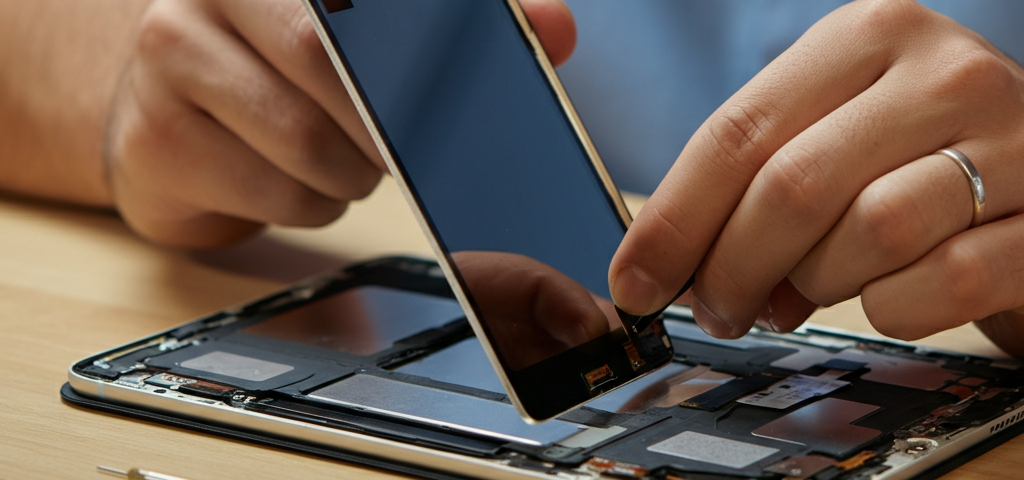
We have all been there. You are sitting on the couch, maybe watching a funny cat video or finishing a big school project. Suddenly—crash! Your iPad slips from your fingers and hits the floor. Your heart stops for a second. You slowly pick it up, hoping for a miracle, but there it is: a spiderweb of cracks across the screen.
It feels like a little disaster, doesn’t it? Our iPads are not just gadgets; they are our movie theaters, our sketchbooks, our libraries, and our connection to friends. When they break, it feels like a piece of our day breaks with them.
But take a deep breath. It’s going to be okay. You don’t need to rush out and spend hundreds of dollars on a brand-new tablet. There is a much better, wallet-friendly solution right here in your neighborhood. If you are looking for reliable iPad repair Brampton, you have come to the right place. We are here to turn that “uh-oh” moment into a sigh of relief. Let’s talk about how we can get your favorite device back in action, good as new!
Common iPad Issues We Fix (and What They Actually Mean)
iPads are tough, but they aren’t invincible. They get bumped, dropped, and splashed. Here are the most common problems we see and exactly how we fix them.
Cracked Screens and Digitizer Replacement
This is the number one reason people come to see us. A cracked screen is annoying, and those little glass shards can actually hurt your fingers! But did you know your screen has two main layers?
- The LCD: This is the part that shows the picture (the lights and colors).
- The Digitizer: This is the glass layer on top that feels your finger when you tap or swipe.
Sometimes, only the glass (digitizer) breaks, but the picture looks fine. Other times, the picture gets all wonky with lines or black spots. Whether you need an iPad digitizer replacement or a whole new screen, we can handle it. We carefully remove the broken bits and put on a fresh, smooth face for your iPad.
Battery Not Holding Charge?
Does your iPad die halfway through a movie? Do you have to keep it plugged into the wall all day? That is no way to live! Batteries get tired as they get older. It’s just a fact of life. If your battery drains faster than water in a bathtub, you need an iPad battery replacement. We swap out the old, tired battery for a brand-new one that holds power all day long. It’s like giving your iPad a double shot of espresso!
Charging Port Problems
You plug in your charger, but… nothing happens. You wiggle the cord. You hold it at a weird angle. Finally, it charges! This is super frustrating. Usually, this means the charging port (the little hole where the cord goes) is dirty or broken. We offer iPad charging port repair to make sure your device drinks up power smoothly every time you plug it in.
Water Damage Restoration
Did your iPad take a swim in the sink? Or maybe a glass of juice spilled on it? Liquid is electronics’ worst enemy. If this happens, turn it off immediately and bring it to us! Don’t try to turn it on. Our iPad water damage repair service involves carefully drying out the insides and cleaning off corrosion (that’s like rust for electronics) to save your device.
Logic Board and Hardware Repairs
Sometimes the problem is deep inside the “brain” of the iPad. This is called the logic board. If your iPad won’t turn on at all, or if it acts really strange, the brain might need a doctor. This is tricky work, but our experts know exactly what to do.
What Makes Us Different?
You might be wondering, “Why should I choose you guys?” It’s a great question. There are lots of places to go, but we believe we offer something special.
Certified Technicians Who Know Their Stuff
Our team isn’t just guessing. We are trained pros. Think of us like certified mechanics, but for tablets. We have fixed thousands of devices, so we have seen it all. You can trust us because we follow strict rules to make sure every repair is done perfectly. We take pride in being the experts in iPad repair Brampton.
“OEM Original Parts” (The Good Stuff)
Have you ever tasted a generic cola that just didn’t taste right? Parts for iPads are the same. Some shops use cheap copycat parts that break easily or don’t look good. We use OEM original parts whenever possible. “OEM” stands for “Original Equipment Manufacturer.” That’s a fancy way of saying we use parts that are just like the ones Apple put in your iPad when it was born. This ensures your screen looks bright and your touch works perfectly.
Affordable Pricing with No Scary Surprises
We know money doesn’t grow on trees. Buying a new iPad is expensive! Our affordable iPad repair services are designed to save you money. We believe in being honest. The price we tell you at the start is the price you pay. No hidden fees, no “oops, we found something else” tricks.
Same-Day Repairs
Who wants to be without their iPad for a week? Nobody! For most common issues like screens and batteries, we offer same-day iPad repair. In many cases, we can fix it while you grab a coffee or run an errand.
Lifetime Warranty
We stand behind our work. That means if we fix your screen and it stops working on its own (not because you dropped it again!), we will fix it for free. That is our promise to you.
What Should You Do If Your iPad Breaks?
Okay, the accident happened. Your screen is cracked or the iPad won’t turn on. Don’t panic! Follow these simple steps to make sure things go smoothly.
- Check for sharp glass: If the screen is shattered, be careful! You can put a piece of clear packing tape over the cracks to keep the glass from falling out and hurting you.
- Back it up: If your iPad still turns on and the touch works, try to back up your data to iCloud. This saves your photos, game scores, and homework just in case.
- Don’t try to fix it yourself: We have seen many people try to fix their iPads with YouTube videos, only to break them even more. iPads are glued together very tightly. Opening them without the right tools is a recipe for disaster.
- Come see us: Bring it to our shop. The sooner you bring it in, the sooner you get back to your digital life.
Our Simple 3-Step Repair Process
We like to keep things easy. You don’t need an appointment, and you don’t need to fill out a mountain of paperwork.
Free Diagnostics and Quote
Bring your sad, broken iPad to us. We will look at it for free. We act like detectives to find out exactly what is wrong. Then, we tell you exactly how much it will cost to fix. If you say yes, we start working. If you say no, that’s okay too! You owe us nothing.
Drop Off Your Device
Hand over your device to our friendly team. We treat every iPad like it belongs to our own family. You can go do your shopping, grab lunch, or just relax.
Fast Repair and Pickup
We get to work immediately. Using our special tools and Certified Apple repair techniques, we swap out the broken parts for new ones. We test everything to make sure it works perfectly. Then, we call or text you to say, “It’s ready!” You come back, pick it up, and smile.
iPad Models We Repair
“But wait,” you ask, “My iPad is really old. Can you still fix it?”
“My iPad is the giant new Pro model. Is that too hard?”
“My iPad is the giant new Pro model. Is that too hard?”
The answer is almost always YES! We repair a huge list of models.
- The Regular iPads: From the older generations to the newest 10th Gen.
- iPad Mini: The small, cute ones! (Mini 1 through Mini 6).
- iPad Air: The thin, light ones (Air 1 through Air 5).
- iPad Pro: The big, powerful ones with the fancy screens (11-inch and 12.9-inch).
Whether you need an iPad software repair because it’s stuck on the Apple logo, or a complex iPad hardware repair, we have the skills for every model.
How to Protect Your iPad from Future Damage?
Once your iPad is shiny and fixed, you want to keep it that way! Here is how you can become an iPad bodyguard.
Use a Case (A Good One!)
A case is like a helmet for your iPad. Don’t just buy the thinnest, prettiest one. Look for one that has “shock absorption” or thick corners. If your iPad falls, the case should hit the ground, not the metal or glass.
Get a Screen Protector
This is a thin layer of tempered glass that sticks to your screen. If you drop your iPad face down, the protector breaks instead of your actual screen. It is much cheaper to replace a $20 protector than a $200 screen!
Careful with Charging
Don’t yank the cord out by the wire. Grab the hard plastic head of the plug. And try not to use the iPad while it’s charging with the cord bent at a sharp angle. This saves your charging port from wearing out.
Keep Drinks Away
This sounds obvious, but we see so many “juice accidents.” Keep your water bottle on the floor or a different table when you are using your iPad.
Why Local Matters: Supporting Brampton’s Community
We aren’t just a faceless company on the internet. We are your neighbors. We live in Brampton, we shop in Brampton, and we love this community.
When you choose a local shop for iPad repair Brampton, you get a personal touch you won’t find at big box stores. We remember your name. We care if you are happy. Plus, you are supporting local jobs and keeping money in our city.
We understand that for many families in Brampton, an iPad is essential for school. When a student’s iPad breaks, they can’t do their homework. That is why we work so fast. We want to help our community stay connected and keep learning. We are proud to be a trusted part of this city.
Frequently Asked Questions
We know you might still have a few questions. Here are the ones we hear the most.
Q: How much does it cost to fix a screen?
A: It depends on which iPad you have. Newer and bigger iPads cost a bit more because the parts are more expensive. But remember, our Affordable iPad repair services are much cheaper than buying a new device. Come in for a free quote!
Q: Will I lose my photos and apps?
A: Usually, no! Replacing a screen or battery doesn’t touch your memory. Your photos of your dog and your high score in your favorite game should be safe. However, we always recommend backing up your data just to be 100% sure.
Q: How long does the repair take?
A: For screens and batteries, we usually finish in 1 to 2 hours. If it is a really complicated problem, it might take a day or two, but we will always keep you updated.
Q: Do you use real Apple parts?
A: We use OEM original parts or high-quality equivalents that perform exactly the same. We want your screen to look crisp and your touch to be sensitive, just like when you first bought it.
Q: What if my iPad fell in water? Is it dead forever?
A: Not necessarily! Liquid damage repair is tricky, but we have a high success rate. The most important thing is to bring it to us FAST. The longer the water sits inside, the more damage it does.
Ready to Fix Your iPad? Let’s Get Started!
Don’t let a broken screen or a dead battery ruin your fun. You don’t have to squint through cracks to read your emails, and you definitely don’t have to be tethered to a wall outlet all day.
Your iPad deserves a second chance. And honestly? You deserve a device that works.
We are ready to help you right now. We combine speed, quality, and a friendly smile to give you the best experience possible. Whether you have a shattered screen, a wonky charging port, or a battery that just gives up, we are the experts you can trust.
So, if you are searching for the best iPad repair Brampton, look no further. Stop by our shop today for a free check-up. Let’s get that iPad back in your hands, looking beautiful and working perfectly.
