

Unlock Your Phone Today: Experience True Freedom
December 3, 2025
Explore Our MacBook Repair Services: The Complete Guide
December 3, 2025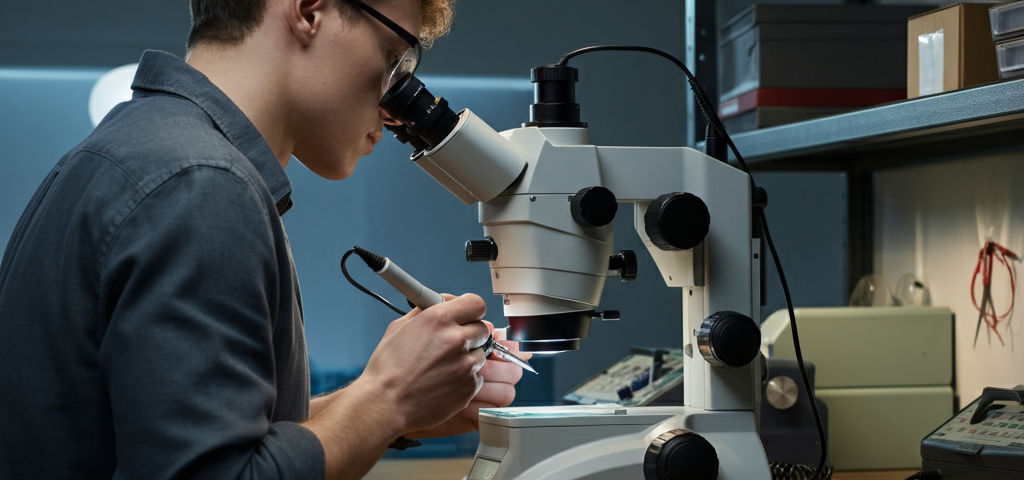
Have you ever looked inside your smartphone or laptop and felt like you were staring at a tiny, alien city? All those little chips and wires look impossibly small. It’s easy to think that if something breaks in there, it’s game over. You might assume you have to toss the device and buy a new one.
But what if I told you that you could fix those tiny problems yourself?
That is the magic of microsoldering. It’s like being a surgeon for electronics. Instead of fixing bones and arteries, you are reconnecting microscopic wires and chips that keep our modern world running. Whether you are a total beginner curious about how things work or a pro looking to sharpen your skills, this guide is for you. We are going to break down everything you need to know—from the tools you need to the tricks that will make you a repair hero.
Let’s dive in!
Microsoldering Tools and Equipment: Everything You Need to Get Started
Imagine trying to eat soup with a fork. It’s messy, frustrating, and doesn’t really work, right? The same logic applies here. You can’t fix a microscopic chip with a giant, clunky soldering iron meant for fixing plumbing pipes. You need the right gear.
Beginner-Friendly Tools
If you are just starting, you don’t need to spend a fortune. You can build a solid toolkit without breaking the bank. Here is the basic list:
- A Good Soldering Iron: Look for one with an adjustable temperature. You don’t want to fry your board because the iron got too hot.
- Solder and Flux: Solder is the metal “glue” that connects parts. Flux is a chemical helper that makes the solder flow smoothly where you want it to go. Think of flux like butter in a frying pan—it just makes everything better.
- Tweezers: Not the ones from your bathroom! You need precision tweezers with super-fine points to pick up tiny components.
- Magnification: You can’t fix what you can’t see. A simple magnifying lamp or a digital microscope that connects to your computer is a great start.
Professional-Grade Equipment
Ready to level up? If you want to tackle serious repairs, like fixing an iPhone that won’t charge or a laptop motherboard that’s dead, you’ll need heavier artillery.
- Stereo Microscope: This is the game-changer. It lets you see in 3D, which is crucial for depth perception when you are working on tiny parts.
- Rework Station: This machine blows hot air. Why? Because sometimes you need to heat up a whole chip to lift it off the board, not just one leg of it.
- Micro-Pencil Iron: This is a soldering iron with a tip as sharp as a needle. It’s essential for working on the tiniest connections under a microscope.
Budget vs. Premium Options
Do you really need the $500 soldering station? Maybe not yet. Budget tools are great for learning. They act as your training wheels. Once you stop burning tips and feel confident, then you can invest in premium gear. Premium tools heat up faster, hold their temperature better, and generally make the job feel smoother. But remember, a great guitarist can still make music on a cheap guitar. It’s about the skill, not just the tool.
Eco-Friendly and Lead-Free Soldering Tools
We all want to keep our planet healthy. Traditional solder contains lead, which is toxic. The industry is moving toward lead-free soldering tools and materials. Working with lead-free solder is a bit different—it melts at a higher temperature—but it’s safer for you and the environment. Plus, many modern electronics require it by law.
Microsoldering Techniques: From Basics to Advanced
Okay, you have the gear. Now, how do you actually do it? Let’s walk through the process.
Step-by-Step Guide for Beginners
- Clean Everything: Dirt is the enemy. Use isopropyl alcohol to clean the area you are working on.
- Apply Flux: Put a little dab of flux on the joint.
- Tin Your Tip: Put a tiny bit of solder on your iron’s tip. This helps transfer heat.
- Heat and Touch: Touch the iron to the part and the pad (the metal spot on the board) at the same time. Then, feed a little solder in.
- Let Go: Remove the iron and let it cool. Don’t blow on it! Let it cool naturally for a shiny, strong joint.
Advanced Techniques for Professionals
Once you master the basics, you can try jumper wire repairs. Imagine a copper track inside the board is broken. You can take a wire thinner than a human hair and build a bridge over the break. It takes steady hands and patience, but saving a $1,000 phone with a $0.01 piece of wire feels amazing.
Another pro move is “reballing.” This is when you take a chip off, clean it, put fresh solder balls on it, and put it back. It’s often the fix for the infamous “Touch Disease” on older phones where the screen stops responding.
Common Mistakes and How to Avoid Them
- Too Much Heat: This burns the board. Start lower and work your way up.
- Cold Joints: If the solder looks dull and clumpy, it didn’t melt right. It won’t conduct electricity well.
- Shaky Hands: Coffee is not your friend here! Relax, breathe, and rest your hands on the table for stability.
Heat Management and Material Properties
This sounds like science class, but it’s practical. Different parts of a board absorb heat differently. A tiny resistor heats up fast. A big copper ground plane (a large area of copper) sucks heat away like a sponge. You have to adjust your technique. If the heat gets sucked away too fast, your solder won’t melt. If it stays too long, you might melt a plastic connector nearby. It’s a balancing act.
What is Microsoldering?
Simply put, microsoldering is soldering performed under a microscope.
Definition and Importance
In the old days, radios and TVs had big parts you could grab with your hand. Today, components are the size of a grain of sand (or smaller!). We call these Surface Mount Devices (SMDs). You literally cannot solder them with the naked eye. This skill allows us to repair the logic boards—the brains—of our devices. Without it, a single failed capacitor could turn a brand-new laptop into e-waste.
Applications in Modern Electronics Repair
It’s used everywhere. Dropped your phone and lost your backlight? That’s a blown filter on the board. HDMI port on your PlayStation loose? That needs to be soldered back on. It is the secret weapon of repair shops.
Why Microsoldering is Essential in the Right to Repair Movement
You bought it, you should be able to fix it. That is the core of the “Right to Repair.”
Overview of Right to Repair Laws
Big companies often tell us that devices can’t be fixed, or they glue everything shut. Right to Repair laws fight for our access to parts, tools, and manuals. They demand that manufacturers stop blocking us from fixing our own stuff.
How Microsoldering Empowers DIY Repairs
When you learn this skill, you take power back. You don’t have to accept that your device is “dead” just because the manufacturer says so. You become part of a rebellion against throw-away culture. You save money, you save the environment, and honestly, it feels pretty cool to outsmart a giant tech company by fixing their product yourself.
Understanding Circuit Board Schematics
Imagine trying to drive across the country without a map. You’d get lost. A schematic is the map for an electronic device.
How to Read and Use Schematics
Schematics look like complex drawings with lines and symbols. But once you learn the symbols (a zig-zag is a resistor, parallel lines are a capacitor), it makes sense. It tells you exactly how electricity flows from the battery to the screen, the camera, and the buttons.
Diagnosing Issues with Schematics
If a phone won’t turn on, you don’t just guess. You look at the schematic. It shows you the “power rail”—the path electricity takes. You can use a tool called a multimeter to check points along that path. If the map says there should be 4 volts here, but you find 0 volts, you found your problem!
Microsoldering Safety Tips
Working with 800-degree tools requires respect.
Essential Safety Gear
- Safety Glasses: Solder can splatter. Protect your eyes.
- Fume Extractor: Melting flux creates smoke that isn’t good to breathe. A fan with a filter pulls that smoke away from your face.
- Heat Resistant Mat: Don’t burn your kitchen table. Use a silicone mat.
Avoiding Common Hazards
Don’t touch the hot end (obviously!). But also, be careful with capacitors. They store electricity and can shock you even if the device is unplugged. And wash your hands after handling solder, especially if it contains lead.
Microsoldering for Specific Devices
Different gadgets have different personalities.
Smartphone Repairs (e.g., iPhones)
Phones are packed tight. The parts are incredibly small. A common repair is fixing a charge port or replacing a chip that controls charging. It requires precision because there are other tiny parts just millimeters away that you don’t want to disturb.
Laptop Motherboard Repairs
Laptops give you a bit more room, but the boards are thicker. This means they suck up more heat. You often need a stronger iron or a pre-heater (a hot plate that warms the whole board) to get the solder to flow.
Gaming Console Repairs
Consoles get hot and dusty. HDMI ports often break because people trip over cables. These ports have many hidden pins that must be soldered perfectly, or you get no picture on your TV.
DIY Microsoldering Projects
It’s not just about fixing broken stuff. It’s about creating!
Fun and Creative Applications
You can build your own custom mechanical keyboards, soldering the switches yourself. You can mod retro game consoles to have better screens. You can make LED jewelry that lights up.
Building Your Own Electronics
There are kits you can buy that let you build digital clocks, radios, or even simple robots. These are fantastic for practicing because if you mess up, you aren’t ruining your expensive phone.
Eco-Friendly Microsoldering Practices
We mentioned lead-free solder, but there is more we can do.
Using Lead-Free Solder
Switching to lead-free is the biggest step. It reduces the amount of heavy metal ending up in landfills.
Reducing Waste in Electronics Repair
The act of repair itself is eco-friendly. Every phone you fix is one less phone mined from the earth and one less phone rotting in a dump. By replacing a $5 chip instead of a $1000 phone, you are a sustainability warrior.
How to Choose the Right Microscope for Microsoldering
Budget Options vs. Professional-Grade Microscopes
Do not buy a cheap USB microscope that you hold in your hand. There is a lag (delay) on the screen that makes it impossible to work. You need a “stereo zoom” microscope. For a budget, look for brands like AmScope. If you have the budget, Leica or Nikon offer incredible clarity, but they cost as much as a used car.
Features to Look For
You want “simul-focal,” which means you can look through the eyepieces and have a camera attached at the same time. You also want a “Barlow lens”—this attaches to the bottom and gives you more working distance so your soldering iron fits under the scope.
The Science Behind Microsoldering
Understanding Heat Transfer
Heat moves from hot things to cold things. Your iron is the hot thing; the board is the cold thing. The “thermal mass” is how much heat the board can soak up. If you touch a tiny iron to a big ground plane, the board wins. The iron cools down instantly, and the solder doesn’t melt. This is why we sometimes use hot air to help the background temperature rise.
Material Properties and Their Impact on Soldering
Gold, copper, tin, lead, silver—we mix these metals to get the perfect joint. Some mixtures are brittle; some are flexible. Knowing what your solder is made of helps you predict how it will behave.
Microsoldering for Data Recovery
Sometimes, the device is smashed beyond repair, like a phone that fell into the ocean.
Repairing Damaged Storage Devices
Even if the phone never turns on again, the data chip might be alive. Microsoldering allows experts to transplant that memory chip onto a working “donor” board just long enough to copy the photos and contacts.
Techniques for Recovering Lost Data
This is high-stakes surgery. One mistake and the data is gone forever. It involves carefully grinding away CPU layers or swapping encrypted chips. It’s the ultimate test of skill.
Microsoldering FAQs
What Tools Do I Need to Start?
Start with a temperature-controlled iron, some flux, good tweezers, and a magnifying lamp. Don’t overcomplicate it at first.
How Long Does it Take to Learn Microsoldering?
You can learn the basics in a weekend. But to get good? That takes practice. Expect to spend a few months tinkering before you feel ready to fix a customer’s device.
Can I Repair My Own Smartphone?
Yes! But start with something broken first. Buy a dead phone on eBay for $10 and practice taking chips off and putting them back on. Don’t learn on your main phone!
Conclusion
Learning microsoldering is like learning a superpower. It gives you the ability to see the world differently—not as a collection of black boxes that break, but as puzzles you can solve. It requires patience, steady hands, and a willingness to learn from mistakes. But the feeling of pressing the power button and seeing a “dead” device come back to life? That is unbeatable.
So, grab an iron, get some flux, and start practicing. The world of microscopic repair is waiting for you.
