

iPhone Software Repair in Canada What It Is, and How to Fix It
September 5, 2026
What Happens Inside an iPhone After Water Damage?
September 15, 2026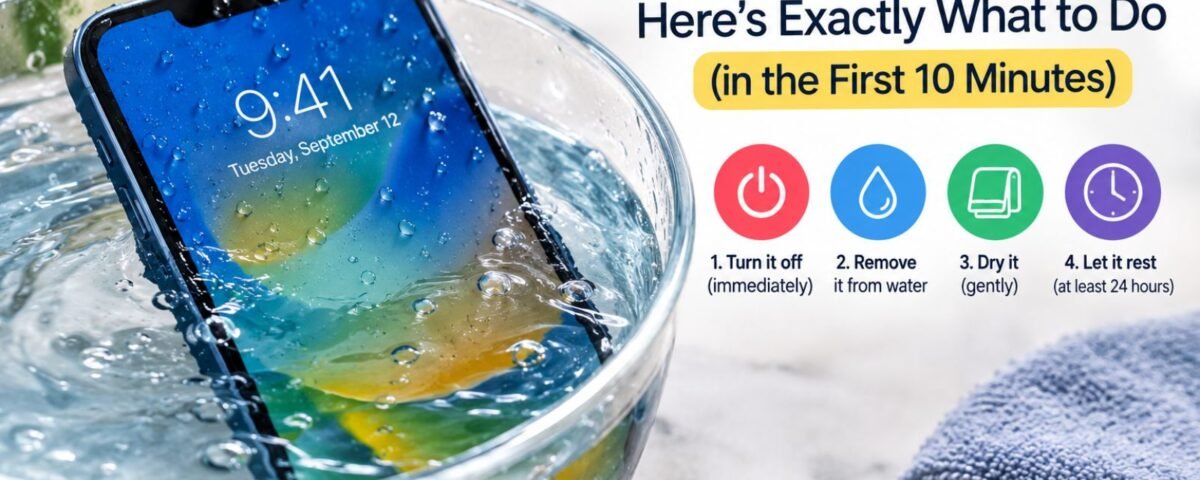
If your iPhone got wet: turn it off immediately, remove the case and SIM tray, wipe gently with a soft cloth, and let it air-dry with the charging port facing down for at least 24 hours. Avoid charging, heat, and rice. If water got inside (red Liquid Contact Indicator), professional repair is your best option in Canada.
Is Your iPhone Even at Risk? (Water-Resistance Basics)
What Does “Water-Resistant” Actually Mean?
Your iPhone isn’t waterproof. Apple has never made one. But since 2016, newer iPhones are water-resistant meaning they’re designed to survive accidental splashes, not intentional submersion.
The catch? Water resistance degrades over time. The tiny seals around your phone’s edges lose their grip after drops, age, and everyday wear. A two-year-old iPhone is measurably less water-resistant than a new one.
iPhone IP Ratings: Which Models Are Protected (and Which Aren’t)
Every modern iPhone has an IP rating a two-digit number that tells you how much water it can handle.
Here’s the breakdown:
| iPhone Model | IP Rating | Safe Depth | Safe Duration |
| Original iPhone → 6S | None | Not water-resistant | |
| iPhone 7, 7 Plus, 8, 8 Plus, X, XS, XR, SE (2nd/3rd gen) | IP67 | 1 meter | 30 minutes max |
| iPhone XS Max, 11, 11 Pro, 11 Pro Max | IP68 | 2–4 meters | 30 minutes max |
| iPhone 12 series, 13 series, 14 series, 15 series, 16 series, 17 series | IP68 | 6 meters | 30 minutes max |
What these numbers mean: The “6” or “8” refers to dust protection (you don’t need to worry). The second number is for water. IP67 = survives a meter of fresh water for 30 minutes. IP68 = survives up to 6 meters for the same time.
But here’s the fine print: Apple tested this in fresh water under controlled lab conditions. Saltwater, chlorine, and high-pressure water (like shower jets) are a different story.
Why Your Water-Resistant iPhone Can Still Get Damaged
Three things break water resistance faster:
- Age & wear. Every drop you survive slightly weakens the seals. After 2–3 years, they’re noticeably weaker.
- Saltwater & chlorine. These are conductive and corrode the tiny seals. Saltwater damage spreads 10 times faster than fresh water damage.
- Screen damage. A cracked screen breaks the seal. Water goes straight in.
Bottom line: Treat your iPhone as “splash-resistant,” not waterproof. Don’t test its limits on purpose.
The First 10 Minutes: Your Action Checklist
This is the moment that counts. If water got inside, the damage isn’t done yet, corrosion (rust) is just starting.
Step 1: Turn Off Your iPhone Immediately (Yes, Really)
Do this first. Before anything else.
If your phone is on, electricity is flowing through wet circuits. That’s a short circuit waiting to happen. Turning it off stops electrical damage from spreading.
How: Press and hold the side button and either volume button until the power-off slider appears. Slide to power off. If the screen is frozen, try a force restart instead (varies by model search “force restart iPhone [your model]”).
If your phone won’t respond, don’t panic. It might be bricked already, or water may have shorted it. Either way, leaving it off is still the right move.
Step 2: Remove the Case and Wipe Gently
Water sits in the tiny gap between your case and the phone. It’s like a moat trapping moisture against the device.
Take off the case now. Also peel away any screen protector if it’s easy to remove.
Use a soft cloth (microfiber, t-shirt, or lint-free cloth) to gently wipe the outside. Don’t rub hard, you’ll just push water deeper into gaps. Pat gently.
Pay special attention to:
- Speaker grills (bottom and earpiece)
- Volume buttons (water loves these)
- SIM card slot (the most vulnerable spot)
- Charging port (another water magnet)
Step 3: Take Out the SIM Tray (Water Escape Route)
This is key. Water pools in the SIM tray cavity because of how it’s angled. Getting it out early prevents water from seeping past the seal and into the main board.
Here’s how:
- Find the SIM ejector tool (comes with your iPhone, or use a straightened paperclip).
- Locate the SIM slot on the side of your phone (usually the right side on newer models).
- Hold your phone so the SIM slot is facing downward. This is important because gravity will help water drip out instead of seeping in.
- Press the ejector tool firmly into the tiny hole next to the SIM slot until the tray pops out.
- Once it’s out, let any water drip from the cavity.
- Don’t reinsert the SIM tray yet. Leave it out for the entire drying period.
Wipe the SIM card gently and set it aside on a dry surface.
Step 4: Air-Dry With the Charging Port Facing Down
Now comes the waiting game.
Find a dry, cool, well-ventilated area. This matters:
- Not a bathroom (too humid)
- Not in direct sunlight (heat can warp components)
- Not in a sealed bag (traps moisture)
- Yes to a bookshelf, bedside table, or kitchen counter with good airflow
Position your phone with the charging port facing straight down or tilted downward. This uses gravity to pull any water droplets out of the internal cavities, rather than letting them sit on crucial circuits.
Lean it against a book, a stand, or prop it up so the port aims down and air can circulate around it.
Now wait. At least 24 hours. Ideally 48.
What NOT to Do: The Common Mistakes That Make It Worse
Panic makes people do things that transform a salvageable phone into a dead one. Here’s what can turn water exposure into serious iPhone damage:
Don’t Charge Your Wet iPhone
This is the #1 mistake that can turn recoverable damage into permanent failure.
Why: Electricity + water can create a short circuit. When you plug in a wet phone, you’re sending power through moisture-affected circuits. It’s like pouring water on a live electrical outlet. Components can fail, and damage that might have been manageable with professional cleaning can become much more serious.
Even if the phone is “off,” residual charge can still be present in the circuits. Some users think “it’s powered down, so it’s safe to charge.” It’s not.
Rule: Do not plug in your iPhone while there’s still a chance that moisture is inside. If you’re unsure whether the phone is completely dry, it’s safer to have it inspected by a professional repair service such as WeFixAll.ca before attempting to power or charge it.
Don’t Use Rice (The Myth That Wastes Time)
You’ve heard this: “Just put your phone in a bag of rice.” It’s become the internet gospel.
It doesn’t work. And it might make things worse.
| Method | How It Works | Success Rate | The Problem |
| Rice | Absorbs moisture passively | 30–40% | Starch dust clogs ports; delays professional help while corrosion spreads |
| Silica Gel | Actively absorbs moisture (desiccant) | 50–60% | Slower than professional cleaning; no guarantee if water went deep inside |
| Professional Ultrasonic Cleaning | Sound waves remove water + stop corrosion | 85–95% | Costs money, but actually works |
Rice doesn’t work because:
- It absorbs water slowly. While you’re waiting 24 hours for rice to work, corrosion is advancing inside.
- Starch residue clogs the tiny speaker grills and charging port making future repair harder.
- It gives you false hope. You think you’re “fixing it,” so you delay getting professional help. Meanwhile, mineral deposits from the water are oxidizing (rusting) on your circuit board.
Better option: Silica gel (the little packets in shoe boxes). It’s designed for moisture removal and leaves no residue. Or skip DIY entirely and go straight to professional repair if water clearly got inside.
Don’t Use Heat (Hair Dryer, Oven, Sun)
Heat seems logical. Warm air dries things, right?
Not for phones. Heat is the enemy.
- Hair dryer: Blasts high-pressure air that pushes water deeper into the phone. Also risks melting solder on the circuit board.
- Oven or direct sun: Extreme heat can warp the screen, damage the battery (swelling risk), and melt component connections.
- Radiator or heating vent: Same problem: too much heat, uneven drying.
Water evaporates naturally in cool, open air. Heat just accelerates damage.
Don’t Keep the Case On
The case traps moisture like a plastic coffin.
Water is stuck in there, pressed against the phone’s back panel, seeping toward the speaker and charging port. Every hour the case stays on, corrosion spreads.
Take it off and leave it off until the phone is completely dry.
What’s Happening Inside? (How Water Damages iPhones)
Understanding the damage helps you understand why certain steps matter.
The Two Types of Damage: Corrosion & Short Circuits
Corrosion (the slow killer):
Water isn’t pure. It carries minerals (calcium, salt, magnesium), dissolved metals, and contaminants. When this liquid touches the copper traces and solder joints on your iPhone’s circuit board, it triggers oxidation, essentially rust.
This rust forms as a green or white powder on the board. It spreads slowly over hours and days, eating away at the metal connections that carry electricity. Eventually, a connection breaks and a component stops working.
Timeline: Visible damage starts in 6–12 hours. Major failures often happen 2–7 days later. You might think your phone is fine on day 1, then wake up to a dead device on day 3.
Short circuits (the instant destroyer):
Your iPhone’s circuit board is like a city with “roads” where electricity flows. When water floods the board, it creates shortcuts pathways where electricity shouldn’t go. When you turn the phone on or plug it in, power surges through these unintended routes, overloading and burning out components in seconds.
This is why you turn the phone off immediately. You’re preventing that surge from happening.
Why Saltwater Is Worse
Saltwater is conductive and carries electricity readily. That means:
- Short circuits happen faster.
- Corrosion spreads 10x faster than with fresh water.
- Chlorine (in pool water) also accelerates corrosion.
If your iPhone took a saltwater dip, professional cleaning becomes much more urgent
The Liquid Contact Indicator (LCI): Apple’s Red Flag
Apple built a detective into your iPhone.
Deep inside the SIM card slot, there’s a tiny dot called the Liquid Contact Indicator (LCI). It’s usually white or silver. If water touches it, it turns bright red.
This dot tells Apple and you whether water actually got inside.
How to Check Your LCI
- Make sure your iPhone is powered off.
- Take out the SIM tray (you already did this in Step 3).
- Shine a bright flashlight or phone light into the SIM slot.
- Look for a tiny colored dot inside the cavity.
- White/silver dot? Water didn’t get inside. You have a shot.
- Red/pink dot? Water penetrated the seal. Professional repair is your only option. Warranty is void.
The LCI is 100% accurate. Apple uses it to settle warranty disputes because it’s objective proof. Don’t argue with it.
Is Your iPhone Salvageable? (Damage Severity & Recovery Options)
After 24–48 hours of air-drying, it’s time to assess.
Here’s a realistic breakdown of your odds, based on damage severity and what you’ll pay in Canada:
| Damage Level | What Happened | Likelihood of Full Recovery | Typical Canada Repair Cost | Timeline |
| Minor | Brief splash, water didn’t enter device, turned off immediately | 85–95% | $0–$150 | 1–2 days (or DIY works) |
| Moderate | Dropped in water for a few seconds, turned off within 1 minute, some internal moisture | 70–85% | $200–$500 | 2–5 days |
| Severe | Submerged for 10+ seconds OR saltwater exposure OR turned on while wet | 40–70% | $600–$1,000 | 5–10 days |
| Critical | Submerged long-term OR saltwater OR powered on multiple times OR visible corrosion | 20–40% | $1,000–$1,500+ | 7–14 days |
The 24–48 Hour Wait: Why Patience Matters
Don’t turn it on yet. I know you want to.
If you power on a wet phone, you risk triggering a short circuit that doesn’t exist yet. You’re essentially giving electricity permission to fry things.
Wait the full 24 hours. Ideally 48, especially if you think water got deep inside.
During this time:
- Don’t press buttons. Even a power-on attempt can cause damage.
- Don’t open the device. You’re not a repair tech; opening it can introduce more air, dust, or additional damage.
- Resist the urge to check. Your curiosity is not worth $800.
After 24–48 hours of dry air, try powering it on. If it boots and all functions work screen, speakers, charging you might have gotten lucky. If it still won’t turn on or starts showing issues, WeFixAll.ca can be a useful option for getting the phone properly inspected and repaired rather than continuing to test it yourself.
Professional Repair: Your Options in Canada
If the LCI is red or if your phone won’t power on after drying, it’s time for professionals.
What Happens at the Repair Shop
A technician will:
- Inspect under a microscope to see where water went and how much corrosion has started.
- Perform ultrasonic cleaning, submerge the circuit board in specialized cleaning fluid and use sound waves to blast away water, minerals, and early-stage corrosion. This stops further oxidation.
- If needed, replace burned components using micro-soldering (a surgical-level repair using a microscope and tiny soldering iron).
Cost Breakdown: Apple Store vs. Third-Party Repair
At Apple Store (with AppleCare+):
- Service fee: $299 CAD
- Condition: You must have AppleCare+ (can’t buy it after damage)
- Speed: 3–7 days
At Apple Store (without AppleCare+):
- Full replacement: $1,100–$1,400 CAD (depending on iPhone model)
- Repair not offered: Apple typically replaces, not repairs
- Speed: 1–2 weeks for replacement stock
At Independent Repair Shops (Toronto, Vancouver, Calgary, etc.):
- Basic ultrasonic clean: $150–$300 CAD
- Full assessment + cleaning + parts replacement: $400–$900 CAD
- Board-level micro-soldering: $800–$1,500 CAD
- Speed: 2–7 days
- Shops to look for: uBreakiFix, Geek Squad (Best Buy), UniversCell, local certified repair providers
Comparison:
- Paying out of pocket at Apple: ~$1,200
- AppleCare+ yearly cost + $299 service fee: ~$500 total
- Independent shop ultrasonic clean: ~$250–$400
Myth-Busting: Rice, Silica Gel, Refrigerators & More
The Rice Myth: Why It Doesn’t Work
People have been putting phones in rice since 2007. It’s become an internet religion.
It doesn’t work.
Rice absorbs water passively and slowly. While you’re waiting 24–48 hours for rice to absorb moisture from your phone, two things are happening inside:
- Corrosion is advancing. Minerals in the water are oxidizing on circuit board traces. Every hour, rust spreads a little farther.
- Your hope is rising. You feel like you’re “doing something,” so you don’t seek professional help. You wait for rice to work. By day 3, corrosion has caused permanent damage that no amount of rice can fix.
Also, rice leaves starch residue in your speaker grills and charging port. Repair technicians hate this because it clogs their diagnostic tools.
Verdict: Silica gel is marginally better (it’s designed for moisture), but neither beats professional ultrasonic cleaning.
Silica Gel: Does It Actually Work?
Silica gel packets (the ones in shoe boxes and jerky bags) are desiccants they actively pull moisture.
Pros:
- No residue
- Reusable (dry them in an oven to recharge)
- Designed for moisture removal
- Faster than rice
Cons:
- Still doesn’t address corrosion that’s already started
- No guarantee if water got deep inside
- Requires 24+ hours minimum
Verdict: Better than rice, but still a gamble. If your LCI is white and you act immediately, silica gel might work as DIY recovery. But if water got inside, you need professional help.
The Hair Dryer Trap (and Why Heat Kills Phones)
A hair dryer seems logical: warm air dries things.
But: A hair dryer does two things to a wet phone:
- Blasts high-pressure air that pushes water deeper. You’re not drying; you’re injecting water further into tight spaces.
- Heat damages components. Sustained heat can warp the LCD screen, melt solder joints on the circuit board, and cause the battery to swell.
Real outcome: Water you thought you were drying ends up deeper inside, causing hidden damage that shows up days later.
Same goes for: Oven, direct sunlight, radiator, heat vent. Avoid all external heat.
Can I Save My iPhone? Next Steps
After 24–48 hours of air-drying:
If your LCI is white and your phone powers on:
- Test basic functions: screen, speakers, charging port, touch response, WiFi.
- If everything works, you likely dodged the bullet. Keep monitoring for the next week (corrosion can be delayed).
- Reinsert the SIM tray and case once you’re confident.
If your LCI is red:
- Water got inside. Warranty is void.
- Option 1: Book an appointment at your nearest Apple Store or certified repair shop.
- Option 2: Contact UniversCell, uBreakiFix, or a local repair shop for a quote.
- Option 3: If the device is old or repair costs exceed 50% of the phone’s value, consider trade-in programs (Apple, Best Buy, carriers offer these).
If your phone won’t power on:
- Don’t keep trying to turn it on; you’ll risk causing more damage.
- Take it to a professional for diagnostics (usually free or $20–$50).
- They’ll tell you if it’s salvageable.
How to Prevent Water Damage in the Future
You got lucky (or unlucky) this time. Here’s how to avoid a second incident.
What “Water-Resistant” Really Means
Your next iPhone will have an IP rating. Remember:
- It’s rated for fresh water, not saltwater or chlorine.
- It’s rated in a lab under perfect conditions, not real life.
- It degrades with age, drops, and wear.
- It’s not a guarantee; it’s a probability.
Think of it as “splash-resistant,” not waterproof. Treat it accordingly.
Simple Habits to Keep Your iPhone Safe
- Don’t take it into a steamy bathroom. Steam penetrates seals easier than liquid water.
- Keep it away from drinks. Soda and juice are conductive; they cause faster corrosion than water.
- At the beach or pool, use a waterproof case or sealed plastic bag. $20–$50 insurance is cheap compared to $1,200 replacement.
- If it gets splashed with saltwater, rinse it immediately under fresh water and dry it with a soft cloth.
- Never test water-resistance on purpose. (Yes, people do this.)
- If your screen cracks, repair it fast. A broken screen breaks the water-resistance seal.
Waterproof Cases & Pouches (Real Protection)
For the ~$30–$80 investment, you get genuine peace of mind:
- Cases: LifeProof, OtterBox Defender, Catalyst (all IP68-rated)
- Pouches: Mpow, Catalyst waterproof pouches ($20–$40) better for beaches since you can take the phone out without unpacking the whole case
- What to look for: Sealed corners, lanyard attachment, clear touchscreen window, reliable reviews
Check the seals monthly. If cracks appear, replace the case.
Available at: Best Buy Canada, Amazon.ca, Apple Store, major retailers.
Conclusion
Your iPhone’s survival depends on the next 30 minutes. Turn it off, remove the case, take out the SIM tray, and let it air-dry for 24–48 hours. Avoid charging, rice, and heat at all costs.
If the Liquid Contact Indicator is red or your phone won’t turn on after drying, professional ultrasonic cleaning in Canada typically costs $200–$500 and has an 85–95% success rate for minor damage.
FAQs
Can an old iPhone with no water resistance survive water damage?
Unlikely, but possible. If it’s off within seconds and dried immediately, 20–30% recovery chance. Best to take it to a repair shop for assessment.
How much does water damage repair cost in Canada?
$150–$1,500+ CAD depending on severity. Basic ultrasonic clean: $200–$400. Full board repair: $800–$1,200+. Apple replacement: $1,100–$1,400.
Will my iPhone work again if it gets wet?
Often yes, but not guaranteed. Modern iPhones (iPhone 7+) have IP ratings; older ones don’t. Acting immediately (turning off, drying) greatly improves odds.
Is AppleCare+ worth it for water damage?
If you pay $189 CAD upfront and damage happens, a $299 repair fee beats a $1,200 replacement. Math says yes. But you can’t buy it after water damage occurs.
Can I save my iPhone if it was in saltwater?
Yes, but it’s urgent. Corrosion spreads faster in saltwater. Get it to a repair shop within 24 hours for ultrasonic cleaning. Cost: $400–$900+.
What’s the Liquid Contact Indicator?
A tiny white or red dot inside the SIM slot that turns red if water got inside. It’s 100% accurate and determines if your warranty is void.
How long should I wait before turning on a wet iPhone?
Minimum 24 hours. 48 hours is safer. Every hour of drying reduces short-circuit risk.
Can I charge my iPhone if the charging port is wet?
No. Wait at least 48 hours. Even then, use a slow charger and watch for any signs of overheating.
