

Ultimate Guide to Screen Protection 2026
July 6, 2026
How to Extend Your Laptop Battery Life 15 Proven Tips That Really Work
July 8, 2026Water Damage First Aid for Your Devices: Do This Before You Do Anything Else 2026
Water Damage First Aid for Your Devices: Do This Before You Do Anything Else
Your phone just went for an unplanned swim. Or maybe coffee met your laptop keyboard at exactly the wrong moment. Either way, your stomach just dropped — and what you do in the next five minutes matters more than almost anything else.
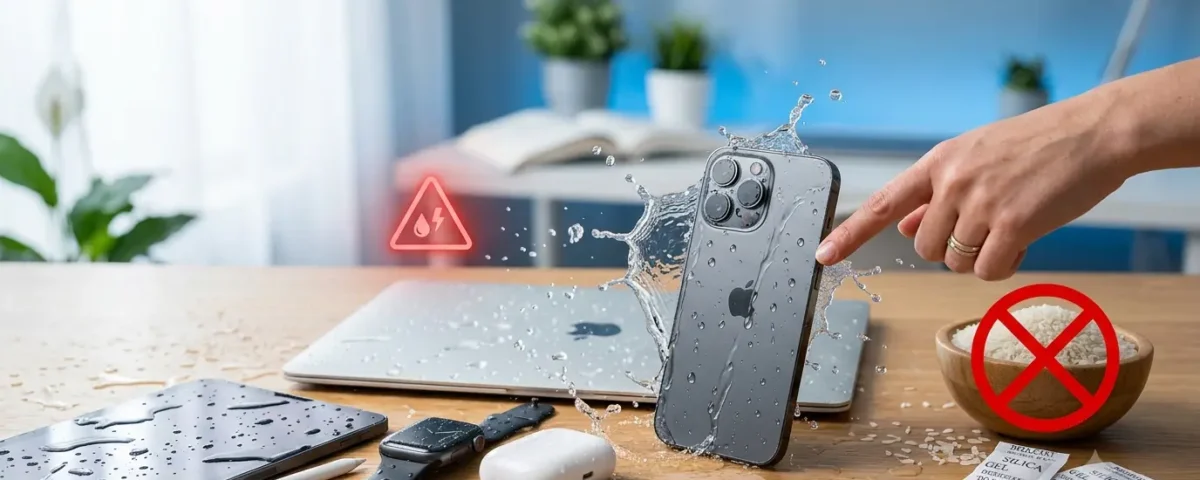
Quick Answer: The moment water touches your device, power it off immediately, remove the case and any cables, and do not try to turn it back on or charge it. Dry the outside gently, then let it rest in a dry, ventilated space for 24–48 hours before testing it. Skip the rice.
Direct Answer
Water damage first aid for your devices means acting fast, powering down before water can short-circuit anything, and resisting every urge to check “if it still works.” Water damage accounts for roughly 21% of all smartphone damage incidents — one in five phones, according to Allstate Protection Plans research — which means this is a scenario most of us will face eventually. The good news? Quick, correct action saves devices far more often than people expect.
The First 60 Seconds — Do This Immediately
Panic makes people do exactly the wrong things. Here’s what to do instead:
- Get it out of the water. Every extra second submerged raises the risk of internal flooding.
- Power it off — right now. If it’s still on, hold the power button until the screen goes dark. Electricity plus water equals corrosion and short circuits.
- Don’t press anything else. Every button you tap can push water deeper into ports and seams.
- Don’t shake it. Shaking feels productive. It isn’t — it just redistributes water to parts that were still dry.
- Position it ports-down. Let gravity help water drain out instead of deeper in.
- Remove the case, SIM card, and any cables. Trapped moisture under a case is a slow-motion disaster.
That’s it. That’s the whole emergency phase. You’re not trying to fix anything yet — you’re just stopping the bleeding.
Device-by-Device First Aid
Not every device behaves the same way once it’s wet. Here’s your triage table:
| Device | Immediate Action | Avoid | Safe Drying Method |
|---|---|---|---|
| Smartphone | Power off, remove case & SIM | Charging, rice, hairdryer | Silica gel packets, 24–48 hrs |
| Laptop | Unplug, remove battery if possible, flip upside-down (keyboard down) | Closing the lid, typing to “check” | Open flat, fan on cool setting, 48+ hrs |
| Tablet | Power off, wipe ports | Charging, tapping the screen | Silica gel, upright drying |
| Wireless earbuds | Remove from case, don’t reinsert | Charging case immediately | Air-dry with speaker mesh facing down |
| Smartwatch | Power off if possible | Charging on magnetic dock | Towel-dry band and casing, air dry |
What Is the First Thing You Should Do If Your Device Gets Wet?
Water Damage First Aid for Your Devices
Power it off. That single action does more to prevent lasting damage than anything else on this list. A device that’s off can’t short-circuit, and a device that isn’t shorting isn’t corroding. Everything else — drying, waiting, testing — only matters once the power is cut.
Why Rice Doesn’t Work (The Science, in Plain English)
Rice has been the go-to fix for decades, and it’s mostly a myth. Here’s why:
- Rice pulls surface moisture, not internal moisture. Your phone’s real danger zones — the charging port, the logic board, the space under the battery — are sealed off from open air. Rice can’t reach them.
- Rice is starchy. As it absorbs ambient humidity, it can leave dust behind, and grains can wedge into ports and speakers.
- It doesn’t address corrosion. Corrosion starts the moment water and metal contacts meet — drying the surface doesn’t stop a reaction that’s already happening internally.
Silica gel packets do the job better because they’re engineered specifically to draw moisture out of enclosed spaces — the same reason they’re tucked into shoeboxes and pill bottles.
Does Charging a Wet Device Really Cause More Damage?
Yes — and it’s one of the fastest ways to turn a recoverable device into a dead one. Charging introduces electrical current into a device that may still have moisture sitting on internal contacts. That moisture creates a galvanic reaction, which is a fancy way of saying two different metals plus liquid plus electricity equals accelerated corrosion. Your charging port is especially vulnerable because it’s the most exposed entry point on the whole device. Wait until you’re confident everything’s fully dry before plugging in.
Also read : Phone Charging Issues
How Long Should You Wait Before Turning It Back On?
24 to 48 hours, minimum. Silica gel can sometimes get the job done in about 24 hours; if you’re relying on open air or a fan, give it the full 48. Yes, waiting is agonizing. But powering on too early is the single most common reason a “probably fine” device becomes an actual write-off. Patience is the cheapest repair tool you have.
A Real Recovery Story
Picture this: a phone dropped straight into a pool, retrieved within ten seconds. The owner’s instinct was to press the power button to “check.” That one press likely did more damage than the pool itself — waking a wet circuit board back up is exactly the wrong move. Compare that to a phone dropped in a sink, powered off within seconds, dried in silica gel for two full days, and untouched the entire time. That phone came back to life with zero issues. The difference wasn’t luck. It was restraint. Techs who’ve seen hundreds of these cases will tell you the same thing: the devices that survive are almost never the ones that got fancy treatment — they’re the ones whose owners simply left them alone long enough.
DIY vs. Professional Repair — The Decision Tree
Ask yourself these questions before deciding your next move:
- Did it fully submerge, or just get splashed? Splashes usually resolve with basic first aid. Submersion — especially in anything other than plain water (pool, ocean, toilet, coffee) — raises the stakes considerably.
- Is there visible corrosion, a burning smell, swelling, or heat? Stop. Don’t attempt DIY drying. Get it to a professional immediately — these are fire and chemical hazards, not just inconveniences.
- Did it go in chlorinated, salty, or sugary liquid? These leave residue that plain drying won’t remove. A specialist repair shop with ultrasonic cleaning is your best bet.
- After 48 hours, does it power on but behave oddly — foggy display, muffled sound, erratic touch response? That points to lingering internal moisture or early corrosion. Professional inspection now is far cheaper than a dead motherboard later.
If none of the red flags apply and your device powers on normally after proper drying time, you’re likely in the clear.
Also read : Grande Prairie Phone Repair
Your Data Isn’t Gone
Here’s something almost nobody tells you in the panic of the moment: water rarely destroys your actual data. Your photos, texts, and files live on a sealed NAND flash memory chip — a component that’s physically isolated inside the phone and remarkably resistant to water intrusion. What water actually attacks is the circuitry around that chip: the logic board, the connectors, the copper traces. That circuitry has to fail completely, and then the chip’s own packaging has to fail too, before your memories are truly at risk. That’s exactly why speed matters — the faster you act, the less time corrosion has to work its way toward the one part of your phone you really can’t replace.
How to Prevent Water Damage Going Forward
- Use a certified waterproof case, especially if you’re regularly near pools, boats, or job sites with liquid exposure.
- Don’t assume an IP68 rating makes your device invincible — those ratings are tested in controlled fresh water, not chlorine, salt, or coffee.
- Back up your data regularly to iCloud, Google Drive, or a computer, so a worst-case scenario never means losing everything.
- Keep devices away from counters near sinks, bathtubs, and pool edges — most water damage happens in genuinely ordinary moments, not dramatic ones.
Frequently Asked Questions
Does rice actually help a wet phone?
Not much. Rice absorbs some surface moisture but can’t reach internal components, and it can leave residue behind. Silica gel packets are a faster, cleaner alternative.
Can a water damaged phone be fixed?
Often, yes — especially if it’s powered off immediately and dried properly for 24–48 hours. Devices with visible corrosion, swelling, or unusual smells need professional repair rather than DIY fixes.
Is it safe to charge my phone after it’s been in water?
No, not until you’re confident it’s completely dry. Charging while moisture remains can trigger a galvanic reaction that accelerates corrosion inside the charging port.
Does a water-resistant (IP68) phone still get damaged by water?
Yes. IP68 ratings are tested under controlled conditions with plain fresh water. Chlorine, salt, sugar, and time all reduce that protection, and the rating typically doesn’t cover accidental damage under warranty.
How do I know if my phone has water damage?
Watch for a foggy display, erratic touchscreen behavior, muffled audio, slow performance, or a charging port that behaves inconsistently. Many phones also have a small liquid contact indicator near the SIM tray that changes color when exposed to moisture.
Will my photos and data survive water damage?
Usually. Your data lives on a sealed NAND flash chip that’s isolated from most water exposure. The circuitry around it is what typically fails first, which is why fast action matters — you’re racing to protect that chip’s surroundings.
Key Takeaway
- Power off immediately — this single step prevents most permanent damage.
- Skip the rice — silica gel packets or a sealed dry container work better.
- Wait 24–48 hours before testing or charging.
- Watch for red flags — corrosion, swelling, or smell means professional help, not DIY.
- Your data usually survives even when the device doesn’t — back it up anyway.
Water damage feels like an emergency because it is one — but it’s a manageable one. Stay calm, power down, and give your device the time it needs to dry properly. That’s genuinely the difference between saving it and losing it.
