

Game Console Repair Services in Canada
August 17, 2026
Phone Repair vs Replacement Cost in Canada 2026
August 19, 2026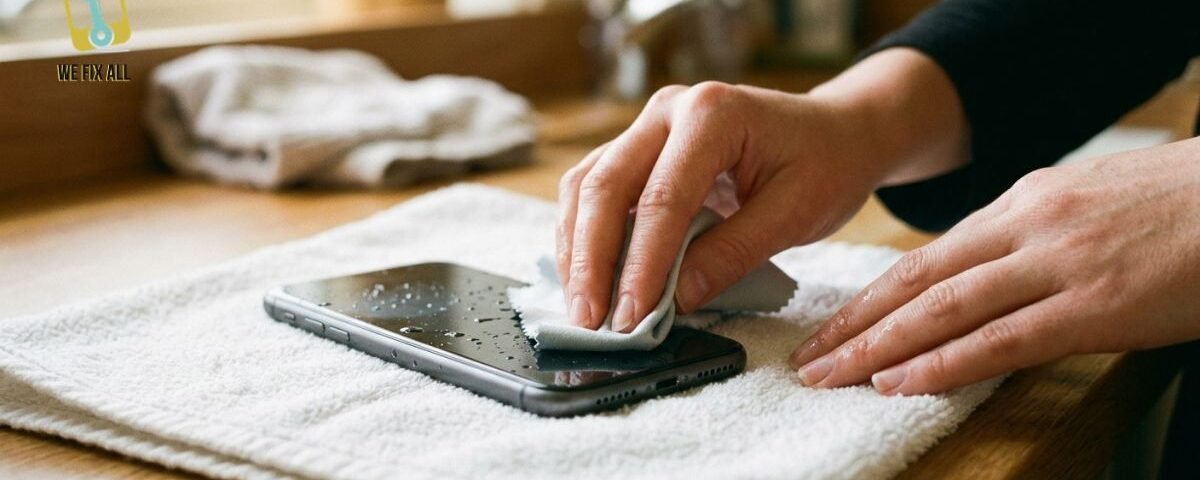
If your iPhone falls in water, power it off immediately, dry the outside gently, and don’t charge it for at least 24–48 hours. Most iPhones (IP67/IP68 rated) survive brief freshwater submersion, but salt water and depth matter. Professional repair in Canada costs 200–600 CAD; check AppleCare+ coverage and carrier insurance first.
The First 10 Minutes What to Do Immediately
You have roughly 10 minutes before serious internal damage accelerates. Here’s the exact sequence:
Step 1: Power It Off Right Now
Don’t wait for the phone to die or ask questions. Hold the power and volume buttons together (or use Settings > Power Off if you can still access it) and shut it down completely.
Why? Power flowing through wet circuits causes electrical arcing and short circuits. The longer electricity runs, the more corrosion spreads through your motherboard. Even if your phone seems fine, internal moisture can cause arcing inside.
Step 2: Remove It from Water Immediately
If it’s still in water, fish it out. Don’t panic; a few more seconds won’t destroy it.
Step 3: Dry the Exterior Gently
Use a soft, lint-free cloth (microfiber is ideal) and pat it dry. Do not:
- Use a hair dryer, heat gun, or any heat source (this accelerates internal corrosion)
- Use compressed air (it forces water deeper into the ports and speakers)
- Rub aggressively (moisture can work its way past seals)
Just pat. Gently.
Step 4: Do Not Charge or Plug It In
Not yet. Not for at least 24–48 hours. Charging a wet phone can cause electrical damage or battery issues.
Step 5: Do Not Open the SIM Tray
Resist the urge to poke around. Every time you open ports or seals, you’re letting air moisture in and letting internal moisture out — and you might damage the water-resistance seals further.
That’s it for the first 10 minutes. You’ve done the critical part. Now we assess.
Does Your iPhone Have Water Resistance? Check Your Model
Your phone’s water resistance rating tells you how much water exposure it can handle. But the rating is not “waterproof forever” it’s specific, and knowing your phone’s limits matters.
What IP67 and IP68 Actually Mean
These ratings come from the international IP (Ingress Protection) standard. Each number has a specific meaning:
IP67 (most older iPhones, and some current models):
- Dust-tight (first digit: 6)
- Water-resistant up to 1 meter (3.3 feet) for 30 minutes in fresh water only (second digit: 7)
IP68 (iPhone 14, 15, 16):
- Dust-tight (first digit: 6)
- Can be fully submerged in water beyond 1 meter, but depth and time limits vary by model (second digit: 8)
iPhone Models & Their Ratings (Canada)
| Model | Rating | Depth Limit | Time Limit |
| iPhone 16, 16 Plus | IP68 | Up to 8m | 30 min (fresh water) |
| iPhone 16 Pro, Pro Max | IP68 | Up to 8m | 30 min (fresh water) |
| iPhone 15, 15 Plus | IP68 | Up to 6m | 30 min (fresh water) |
| iPhone 15 Pro, Pro Max | IP68 | Up to 6m | 30 min (fresh water) |
| iPhone 14, 14 Plus | IP68 | Up to 6m | 30 min (fresh water) |
| iPhone 13, 13 mini | IP68 | Up to 6m | 30 min (fresh water) |
| iPhone 12, 12 mini | IP67 | 1m | 30 min (fresh water) |
Important: These ratings apply to fresh water only. Salt water, chlorinated pools, and other liquids (coffee, juice, seawater) are not covered and cause corrosion much faster.
Is Your iPhone Actually Damaged? Diagnosis Checklist
Not all water exposure means permanent damage. Let’s figure out where yours stands.
After 2–4 hours of drying, answer these questions:
Does your iPhone power on?
- Yes → Good sign. Skip to “Check for liquid damage signs” below.
- No → It might have powered off due to internal moisture, or there’s deeper damage. Go to the DFU mode section.
Check for liquid damage signs:
- Water droplets or condensation inside the screen (between the display and glass)?
- A white, green, or brown residue around the charging port or speakers?
- The phone feels warm (even though you haven’t charged it)?
- Any burning or acrid smell?
- Is the screen unresponsive or flickering?
- Any part of the phone feels swollen or bulging?
If any of these are true: Your phone has internal liquid damage. Stop here and skip to the “Repair Options” section. Professional help is your best path.
If none are true, but the phone still won’t turn on:
Try DFU mode (a recovery method that sometimes works even with liquid exposure):
- Connect to a computer with iTunes or Finder
- Force restart: Press and hold power + volume down for 10 seconds
- Continue holding and release only power (keep volume down pressed)
- The phone should show the USB/recovery icon
- Follow the on-screen restore process
If DFU mode works, your phone might recover. If it doesn’t, the motherboard damage is likely permanent.
The Wait-and-Dry Method: When & Why It Works (or Doesn’t)
You’ve powered off and dried the exterior. Now comes the hardest part: waiting.
The Right Way to Dry (24–72 Hours)
Place your phone in a well-ventilated area, a room with open windows or a fan running gently. This is called passive air drying, and it’s the only method that actually works.
Why passive air? Air naturally evaporates moisture over time without accelerating corrosion (unlike heat). Your goal is to let humidity levels drop slowly around the phone, drawing internal moisture out.
Don’t use:
- Rice (it’s a myth rice is only marginally hygroscopic, adds rice dust to ports, and takes too long anyway)
- Hair dryers or heat guns (heat speeds up oxidation of copper circuits, making corrosion worse)
- Ovens or microwaves (will destroy components and risk fire)
- Compressed air (forces water deeper into the phone instead of out)
Timeline Expectations
- Fresh water: 24–48 hours of drying usually allows safe charging attempt
- Salt water or pool water: 48–72 hours (chlorine and salt accelerate corrosion, so longer drying is critical)
- High humidity environments: Add 12–24 hours (moisture in the air slows evaporation)
Silica gel packets (those little pouches in electronics boxes) can speed up the process slightly if you have them, but they’re not essential. Just ventilation works fine.
After Drying: The Safety Check
Before you charge, look again for:
- Condensation inside the display
- Corrosion around ports (white, green, or brown residue)
- Any swelling or bulging
- A burning smell
If you see any of these, do not charge. Go straight to “Repair Options” below.
If the phone looks clear, plug it in. Watch it carefully for the first hour if it gets hot, the battery might be damaged. Unplug immediately if you notice overheating.
Your Repair Options in Canada: Costs & Coverage
Your phone dried and won’t turn on, or it’s showing signs of internal damage. Or maybe it works but you’re worried about long-term reliability. Here’s what you can do in Canada.
Option 1: Apple Store / Apple Authorized Service
This is usually your best bet for warranty and quality.
Cost: 199–599 CAD (depending on model and extent of damage)
- iPhone 16 water damage service: ~$499 CAD
- iPhone 15: ~$349 CAD
- iPhone 14 and earlier: ~249–299 CAD
With AppleCare+: $99 incident deductible (a huge savings if you have it)
Timeline: 2–5 business days (varies by location and parts availability)
Warranty: 90 days on parts; 1 year on labor
Finding a location: Apple.com/ca has a “Repair” section where you can book a Genius Bar appointment or ship your phone to Apple’s service center in Ontario.
Process:
- Book online or call your local Apple Store
- Bring your phone + proof of purchase (helps with warranty claims)
- Apple diagnoses (usually free) and quotes repair cost
- If you agree, they repair and test before you leave
Does AppleCare+ cover water damage? Yes, but you’ll pay the $99 incident deductible. This is almost always cheaper than paying the full service cost.
Option 2: Carrier Insurance (Rogers, Bell, TELUS)
Most Canadian cell plans include optional device insurance. Water damage is usually covered.
Cost: Deductible of 50–150 CAD (depending on your plan and provider)
Coverage: Most plans cover accidental damage, including water damage
Timeline: 3–10 business days for shipment + processing
Process:
- Contact your carrier and file a claim
- Ship your phone (they provide a label; you cover shipping or they do, varies by plan)
- Wait for repair or replacement
- Device is returned or replacement arrives
Downside: You’re without your phone during the entire process (3–10 days). Plus, they sometimes send a refurbished replacement instead of repairing yours.
Pro tip: Check your plan details now to see if water damage is covered. Some basic plans exclude it.
Option 3: Independent Repair Shops (Canada-Based)
Faster and often cheaper than Apple, but voids your Apple warranty.
Cost: 150–400 CAD (often 30–50% cheaper than Apple)
Timeline: Same-day to 2 days (varies by shop)
Quality: Depends entirely on the shop. Look for:
- Online reviews (Google, Yelp)
- Certifications (some use genuine parts; others use aftermarket)
- Warranty on repair (at least 30 days)
Risk: Aftermarket parts may fail sooner, and your Apple warranty is voided.
Best for: Budget-conscious users who can’t wait, or whose phones are already out of warranty.
Finding a shop: Google “iPhone water damage repair near me” + your city. Call a few and ask about turnaround and parts (genuine vs. aftermarket).
Option 4: Insurance Replacement (if damage is severe)
If your phone is unrepairable, some insurance policies and AppleCare+ offer replacement.
Cost: AppleCare+ replacement deductible is 99–149 CAD; carrier insurance deductible is 50–150 CAD
What you get: Refurbished iPhone (same model or equivalent)
Timeline: 5–10 business days for carrier; 2–3 days for Apple (if in stock)
Best for: Older phones where repair costs exceed 50% of replacement value, or phones with multiple damage points (water + previous damage).
Comparison Table Which Option Is Cheapest?
| Scenario | Apple (no AppleCare+) | Apple (with AppleCare+) | Carrier Insurance | Independent Shop |
| Light water damage (phone works) | 249–499 | $99 | 50–150 | 150–250 |
| Heavy water damage (won’t turn on) | 399–599 | $99 or replacement | 50–150 or replacement | 250–400 or not repairable |
| Time to repair | 2–5 days | 2–5 days | 5–10 days | 1–2 days |
| Warranty | 90 days parts | 90 days parts | 30 days (varies) | 30 days (varies) |
Bottom line: If you have AppleCare+, use it (the $99 deductible is unbeatable). If you don’t, carrier insurance is second-best if available. For speed, go independent. For peace of mind, Apple is worth the premium.
Secondary Risks: Battery Swelling & Thermal Damage
Water damage doesn’t just cause immediate electrical failure. It can trigger two dangerous secondary issues.
Battery Swelling
When water seeps into the battery case, it can react with the lithium-ion chemistry inside, creating gas. This pressure causes the battery to swell, pushing on the screen and back case.
Signs of battery swelling:
- The back of your phone is visibly bulging or warped
- The screen is separating from the frame
- The phone feels unnaturally warm (even after drying)
What to do: Stop using the phone immediately. A swollen battery can catch fire or explode, especially if charged. Take it to a repair shop or Apple Store right away. Do not leave it plugged in.
Thermal Damage
Water + electricity = heat. Oxidation of copper circuits also generates heat, and this can warp delicate components (capacitors, solder joints, the processor).
Signs of thermal damage:
- The phone gets hot without charging
- The battery drains rapidly
- Random power-offs (the processor is failing)
- The screen flickers or glitches
What to do: Professional repair is needed. DIY drying won’t fix heat damage once it’s done.
Conclusion
Act fast power off your iPhone immediately when it’s wet. Dry gently passive air drying for 24–72 hours works. Wait before charging, let the phone sit before you plug it in. Check for damage if you see corrosion, swelling, or condensation inside the screen, get professional help. Know your options Apple repair ($99 with AppleCare+, or 249–599 without) is usually your best bet in Canada; carrier insurance is next; independent shops are fastest.
FAQs
Can I use my iPhone again after water damage?
Yes, if it dries properly and doesn’t show signs of liquid damage (corrosion, condensation, swelling). But monitor it closely for 2–4 weeks corrosion can cause delays and failures (a weak solder joint might fail days or weeks later).
Will AppleCare+ cover my water-damaged iPhone?
Yes. AppleCare+ covers accidental damage, including water damage. You’ll pay a 99–149 CAD incident deductible, but that’s much cheaper than the full 400–600 service cost. This is one of the best reasons to have AppleCare+.
How do I know if my iPhone is ruined?
Signs of permanent damage: battery swelling, visible corrosion (green/white residue on internal components visible through ports), burning smell, or complete failure to power on after 48 hours of drying. If you see any of these, professional repair is your only option.
Can water damage happen days later?
Yes. Oxidation is a slow process. A phone might work fine immediately after drying, then fail 1–3 weeks later as corrosion eats through solder joints. This is why you should avoid heavy use and monitor for signs (unexpected shutdowns, screen flickering) over the next month.
Should I open my iPhone myself to dry it?
No. Opening your phone voids your warranty and can damage water-resistance seals further. The small amount of moisture that enters through normal openings will evaporate on its own; you don’t need to open it to speed that up.
Does salt water damage iPhones faster than fresh water?
Yes, significantly. Salt is conductive and accelerates oxidation. If your iPhone fell in the ocean or a salt pool, extend drying time to 48–72 hours and inspect more carefully for corrosion. Consider professional cleaning to remove salt residue.
If I wait 48 hours and it works, is it safe to use?
Probably yes, but with caution. Use it lightly (no intense gaming or video) for another week to let any remaining internal moisture evaporate. Avoid charging it heavily. If it keeps working without weird behavior (overheating, unexpected shutdowns, screen glitches), you’re likely fine. But backup your data regularly in case it fails later.
