

iPhone in Water? Here’s Exactly What to Do (in the First 10 Minutes)
September 14, 2026
Does Putting Your iPhone in Rice Actually Work?
September 17, 2026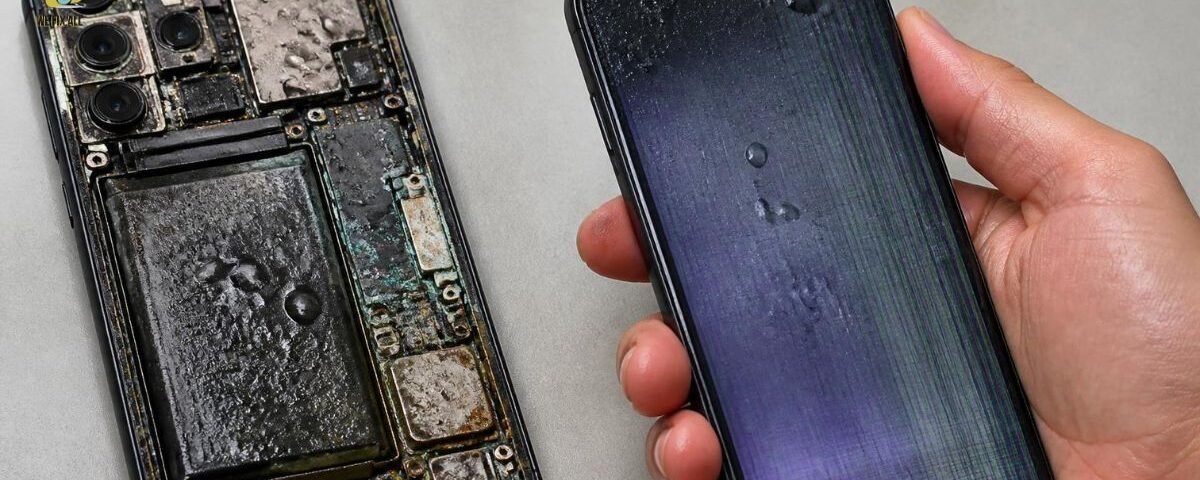
The moment water reaches your iPhone’s internal circuits, it can trigger an electrical short and start a corrosion process on the logic board, battery contacts, and connectors. This damage doesn’t always show up right away; a phone can work normally for days or weeks before failing. Acting fast (powering off, not charging, and getting it checked) is what actually determines whether the phone survives.
What Actually Happens the Moment Water Gets In
An iPhone’s logic board packs thousands of tiny circuits and copper traces into a space smaller than a credit card. Water, especially water carrying minerals, salt, or sugar conducts electricity. When it bridges two circuits that were never meant to touch, it creates a short.
A short circuit is an unintended electrical connection that causes current to flow where it shouldn’t, which can instantly damage or destroy the component it passes through.
If the phone is powered on when water gets in, that risk is immediate. This is the single biggest reason every repair guide including Apple’s own tells you to shut the device down the second it gets wet: no power flowing means no short circuit forming.
But the short is only step one. Once moisture is sitting on the board, a second, slower process begins: corrosion.
The Corrosion Timeline What Happens Hour by Hour
This is the part most guides skip, and it’s the part that actually explains why a phone that “seems fine” can die a week later.
Corrosion isn’t instant, but it isn’t slow either, it’s progressive. Here’s roughly how it unfolds once water reaches internal components:
- Immediately (seconds to minutes): If the phone is on, an electrical short can occur right away. Water begins spreading under shields and into connector pins.
- First 24 hours: Surface moisture dries, but water can remain trapped under the battery connector, camera module, or beneath the logic board shielding invisible from the outside.
- Days 1–3: Trapped moisture starts oxidizing exposed metal contacts. Early symptoms often begin here: intermittent charging, a muffled speaker, or a flickering display.
- Days 3–14: Corrosion spreads along circuit traces. This is the window where phones that charged fine “last night” suddenly won’t turn on the next morning.
- Weeks later: If corrosion reaches the battery connector or logic board power lines, you can see a complete, sudden failure even though the phone worked normally in between.
The takeaway: a working phone right after a spill is not proof the phone escaped damage. It’s often proof the damage hasn’t reached a critical point yet.
Is Your iPhone “Water-Resistant” or “Waterproof”? (They’re Not the Same Thing)
No iPhone is waterproof. Every iPhone is, at best, water-resistant, and that resistance is rated using an IP (Ingress Protection) code.
| Rating | What it means |
| IP67 | Can withstand accidental immersion in up to 1 meter of water for up to 30 minutes |
| IP68 | Can withstand accidental immersion in up to 6 meters of water for up to 30 minutes (depending on model and Apple’s published spec) |
Two things matter here that most people miss:
- These ratings apply to fresh, still water under lab conditions, not pools, oceans, hot tubs, or accidental drops in coffee, juice, or soda, all of which corrode faster than plain water.
- Water resistance degrades over time. Seals wear down with drops, heat, and age, so a five-year-old iPhone doesn’t have the same protection it had on day one even if it’s the same model that shipped with an IP68 rating.
How to Tell If Water Got Inside: The Liquid Contact Indicator
Every iPhone since roughly 2006 has one or more Liquid Contact Indicators (LCIs) small stickers built into the device that change from white or silver to solid red on contact with water or any liquid containing water.
According to Apple’s own support documentation, the LCI activates specifically from liquid contact, not from everyday humidity or temperature swings within the phone’s normal operating range.
Where to find it: On most modern iPhones, an externally visible LCI sits inside the SIM tray slot, eject the tray with a SIM tool or straightened paperclip and shine a flashlight into the opening. Some models also have internal LCIs near the battery connector or display cable, but those are only visible if a technician opens the device.
What a red LCI means for you:
- It confirms liquid contact not necessarily permanent damage, but exposure.
- It can affect eligibility for standard warranty repairs, since Apple’s warranty explicitly excludes liquid damage.
- A red LCI plus a working phone still means you should power it off and get it checked. The indicator tells you exposure happened, not how much corrosion has (or hasn’t) started.
Does Rice Actually Dry Out an iPhone?
No. Rice absorbs some surface moisture, but it can’t reach water trapped inside sealed components, and it does nothing to stop corrosion that’s already begun on internal contacts. It also introduces a real risk: dust and starch particles getting pulled into ports and speaker openings, adding a second problem on top of the water damage.
Air-drying at room temperature, powered off, for at least 24–48 hours is the more reliable DIY step but it only removes surface moisture, not internal corrosion. If corrosion has started, drying time alone won’t reverse it.
Is iPhone Water Damage Permanent?
Not always but it’s a race against time. If the phone is powered off immediately and gets professional cleaning before corrosion spreads, there’s a reasonable chance of a full recovery. If corrosion has already reached the logic board or battery connector, damage can become progressive and, in some cases, unrepairable through standard drying or DIY methods.
How Long Should You Wait Before Turning a Wet iPhone Back On?
At minimum, 48 hours powered off, based on the standard guidance repair professionals give for allowing trapped moisture to clear. If you can wait longer without the device, longer is better. The goal is giving any residual moisture time to evaporate before current flows through the board again. Checking the LCI (white/silver vs. red) is a more reliable signal than a fixed clock, since it tells you whether liquid actually reached the indicator, not just how much time has passed.
Does Apple’s Warranty Cover Water Damage?
No. Apple’s standard One-Year Limited Warranty explicitly excludes liquid damage, because it’s classified as accidental rather than a manufacturing defect.
AppleCare+ is the exception; it adds accidental damage protection, including liquid damage, typically for a service fee rather than a full-price repair or replacement. Coverage details and fees vary by iPhone model and plan, so check your specific AppleCare+ terms before assuming what’s included.
One more warranty wrinkle: if your LCI has turned red, that alone can be used to determine a device isn’t eligible for standard (non-AppleCare+) warranty service, even if the visible symptom you’re reporting seems unrelated to water Apple’s documentation treats a triggered LCI as evidence of liquid exposure, full stop.
What a Technician Actually Sees When They Open a Water-Damaged iPhone
Based on how professional water-damage repair typically proceeds: technicians don’t just dry the phone. After confirming liquid exposure via the LCI, the standard process involves fully disassembling the device, inspecting the logic board and connectors under magnification for corrosion or mineral deposits, and running an ultrasonic cleaning pass submerging components in a cleaning solution and using high-frequency sound waves to dislodge oxidation that a cloth or brush can’t reach. Batteries exposed to liquid are generally replaced outright rather than reused, since a water-exposed battery carries an ongoing swelling risk even if it still holds a charge. Every component is then tested individually, charging, display, speakers, cameras before the phone is reassembled.
This is the gap between what a home fix can achieve and what a real repair addresses: drying removes water. It doesn’t remove corrosion that’s already formed, or the mineral residue that keeps attacking metal contacts after the water itself is gone.
Water Damage Repair Cost in Canada
(Flagging for the brand to confirm exact current pricing ranges below are compiled from published Canadian repair-industry sources and should be treated as general guidance, not a quote.)
- Apple / AppleCare+ route: If you have AppleCare+, water damage repair is typically handled at a set service fee rather than full replacement cost; without AppleCare+, Apple generally treats liquid damage as an out-of-warranty repair, which can run close to full replacement pricing depending on the model.
- Third-party / independent repair shops: Canadian repair shops commonly quote water-damage assessment and repair in a broad range often cited around $100–$300+ CAD, with the final cost depending on how far corrosion has spread and which components (battery, charging port, logic board) need replacing.
- Why the range is so wide: A simple case quick shutdown, minor moisture, cleaned before corrosion sets in costs far less than a case where corrosion has already reached the logic board and requires micro-soldering or board-level repair.
The rule of thumb worth applying: if your repair quote comes in above roughly half of your iPhone’s current resale or trade-in value, replacement is usually the more sensible financial call.
How to Prevent Future Water Damage
- Use a genuinely waterproof case (not just “water-resistant”) if you’re regularly near pools, kitchens, or bathrooms.
- Don’t rely on the IP rating as a guarantee treat it as a buffer, not permission to submerge the phone intentionally.
- Get it checked immediately after any exposure, even if it still works early inspection is what actually prevents the delayed-failure scenario described above.
- Avoid charging a phone you’re not sure is dry that’s the single most common way people turn a minor exposure into a logic board failure.
Conclusion
Water damage can affect an iPhone far beyond what you can see on the outside. Moisture can reach internal components, cause short circuits, corrode connectors, damage the battery or display, and gradually lead to performance problems even if the phone initially seems to work normally. The sooner the device is powered off and professionally inspected, the better the chances of preventing further damage. Avoid charging or repeatedly turning on a wet iPhone, and seek professional repair if you notice issues such as unexpected shutdowns, charging problems, screen glitches, or speaker and microphone failure.
FAQs
Does rice dry out a water-damaged iPhone?
No. Rice can absorb some surface moisture but can’t reach water trapped inside sealed components or reverse corrosion that’s already started. It also risks pulling dust into ports and speakers.
How long should I wait before turning my iPhone back on after it gets wet?
At least 48 hours powered off is the standard guidance. Checking whether the Liquid Contact Indicator is white/silver (clear) or red (exposed) is a more reliable signal than time alone.
Is iPhone water damage always permanent?
Not always. Quick shutdown and professional cleaning before corrosion spreads gives a real chance of full recovery. Once corrosion reaches the logic board or battery connector, damage can become progressive.
Does Apple’s warranty cover water damage?
No Apple’s standard One-Year Limited Warranty excludes liquid damage. AppleCare+ is the plan that adds accidental liquid-damage coverage, usually for a service fee.
How do I know if my iPhone has water damage?
Check the Liquid Contact Indicator inside the SIM tray. A red LCI confirms liquid contact. Other signs include muffled speakers, a flickering or discolored display, a phone that won’t charge, or unexpected shutdowns.
How much does it cost to fix a water-damaged iPhone in Canada?
It varies widely by how much corrosion has spread and which components are affected third-party Canadian repair shops commonly quote assessment-and-repair ranges in the low hundreds of dollars, while Apple’s out-of-warranty or AppleCare+ pricing depends on your specific plan and model.

2 Comments
[…] real cost of waiting? You’re looking at 300–500+ in water damage repairs, degraded battery performance, or a completely dead phone within weeks or months. Compare that to a […]
[…] and other popular models. Our repair services include screen replacement, battery repair, water damage repair, camera repair, and charging issue […]